

CSA Auto Renewal - How it Works
Subscription renewal is only for members who maintained a subscription throughout the previous year’s season. Subscriptions that were cancelled, left unpaid, or are older than one year are not eligible for renewal.
About our CSA Subscription Renewal
Before CSA shares go on sale to the public, members have an opportunity to automatically subscribe to the following year’s subscription of the same season through the process of renewal.
Summer CSA Subscriptions renew into the following years Summer CSA subscription, and Winter CSA subscriptions renew into the following years Winter CSA subscription. This allows members who only want Summer shares or members who only want Winter shares to stay enrolled in their CSA program of choice.
Summer CSA shares are renewed in early February, Winter CSA shares are renewed in early August. If you subscribe to both a Winter and Summer CSA share, you will have two renewal periods throughout the year, one in February and one in August. See below for How to Renew Your Subscription.
How Subscription Renewal Benefits our Returning CSA Customers
Many of our CSA pick-up locations fill up quickly once sign-ups are open. Renewing your previous year’s CSA membership secures your spot at your preferred CSA pick-up location. We give return members priority, so even if you’d like to change your pick-up location, we can guarantee availability during the renewal process. Once CSA shares go on sale to the public, we are no longer able to guarantee a spot at your preferred location, even if you are a returning CSA member.
How Subscription Renewal Benefits the Farm
While our Summer CSA doesn’t start until June, we are planning and ordering seeds in January. Almost everything that you receive throughout your Summer CSA share is already planted by the time you receive your first box. Our Winter CSA crops are all seeded mid summer, months before you receive your first box in October. Having a ballpark idea of our CSA membership numbers early on helps us better plan for the growing season ahead!
How to Renew your CSA Subscription
Members can choose to renew a subscription through two different means: by email or within your CSA member account.
To renew by Email:
About 3 weeks before our scheduled subscription auto-renewal, you’ll receive an email asking you to confirm or opt-out of your CSA share renewal. In order to successfully renew your CSA subscription, select “Confirm” in this email. We will send a second reminder email the week before our scheduled auto-renewal as a reminder. Only members who have not yet confirmed will receive a second reminder email.
If you are not interested in renewing your CSA subscription, you can select “Opt-Out” or ignore this email. Only Confirmed subscriptions will automatically renew.
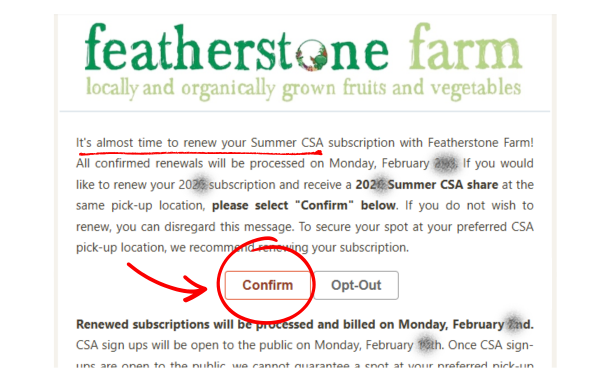
By selecting “Confirm” when you receive a renewal email, you agree to receive the same subscription size and add-ons through the same payment method as your previous share. If you would like to change your pick-up location, share size, add-ons, or payment method please contact csa@featherstonefarm.com before confirming. On our scheduled renewal date, your payment method on file will be automatically billed and a new subscription will be generated. We renew Summer shares in early February, and Winter shares in early August (exact dates vary year to year). Share pricing can vary slightly from year to year, and up to date pricing will always be included in the renewal email.
Renew using your CSA Member Account
To manually confirm renewal within your CSA member account, or to double check that your account is confirmed for renewal, log in to your member account.
Go to the bottom of this section for a video tutorial.
From here, select the “Orders” tab, and click “View Subscription History.”
Under the “name” column, select the share from the previous year that is about to renew. We renew Summer shares in February, and Winter shares in August. If you would like a 2027 Summer subscription, select your 2026 Summer Share.
This will pull up your share information including your pick-up location, share size, as well as tabs to see any Add-ons (that will also be scheduled to renew) and your payment history, including payment method and amounts. All of this information will be duplicated when your share is renewed. If you would like to change your pick-up location, share size, add-ons, or payment method please contact csa@featherstonefarm.com to secure your pick-up spot.
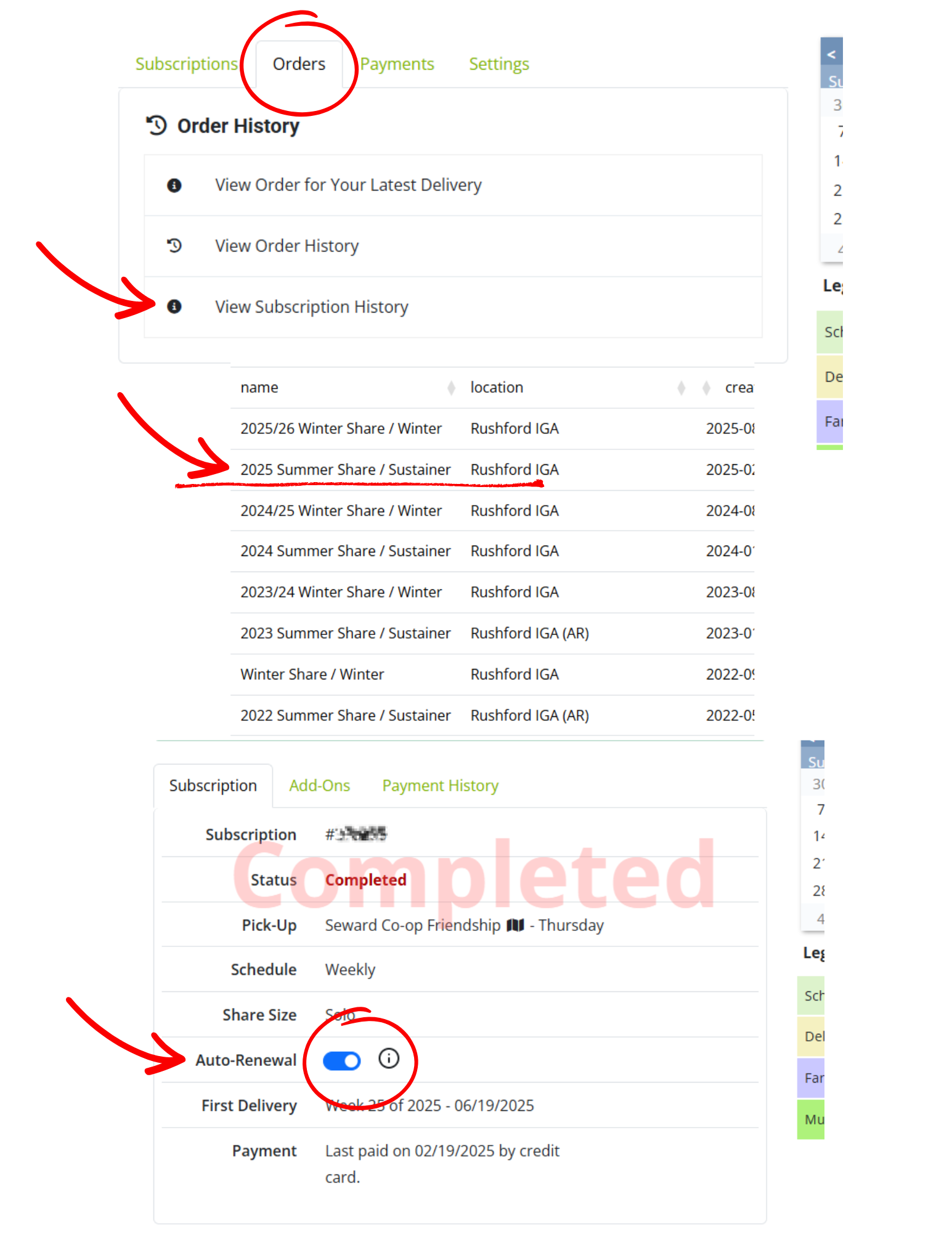
Under the “Subscription” tab, there is a toggle button next to Auto-Renew. If this button is blue, your subscription is confirmed to automatically renew on our scheduled renewal date. Your payment method on file will be billed and a new subscription will be generated on our scheduled date.
If the toggle is to the left and gray, your subscription will not renew.
You can change your renewal status by toggling the button, but make sure your changes are made before the scheduled renewal date! We renew Summer shares in early February, and Winter shares in early August (exact dates vary year to year). Late renewal confirmations will not be processed. If your subscription did not renew and CSA shares are not yet available to the public, please email csa@featherstonefarm.com for manual renewal assistance.
Check out this simple video tutorial and learn how to navigate your CSA Member account to check and update your renewal status.
Subscription Renewal FAQs
-
If you’d like to make changes to your subscription before it renews, please contact Nicole at csa@featherstonefarm.com for assistance. Changes to pickup location, share size, and payment method are all possible, but they have to be done on the back end.
-
If your payment method is expired or declined, your subscription renewal will not process. We contact all failed renewals the afternoon of our scheduled auto-renewal, and you’ll have the opportunity to update your payment information before CSA shares go on sale to the public. Once sign-ups are public, you’re no longer eligable for renewal, and you’ll have to sign up for a new subscription at our storefront.
-
Only Confirmed subscriptions will renew. You can either select “Opt-Out” or ignore the renewal email you received, and your subscription will not renew. Use the steps listed above to double check your renewal status within your CSA member account.
-
Yes, all completed add-ons associated with your previous subscription will renew along with your CSA share (canceled add-ons will not renew). This means if you purchased two egg shares, you’ll be automatically signed up for two egg shares again when your subscription renews. If you’d like to adjust the quantity or remove your add-ons from your subscription, please email csa@featherstonefarm.com before the scheduled auto-renewal date to ensure you are billed correctly.
-
Scroll up to read how to check your renewal status within your CSA member account, or email Nicole at csa@featherstonefarm.com and she can check for you!
-
Some years we may change the price of the share you are renewing. We will include any price changes and important CSA share information in the Renewal email we send out prior to our scheduled auto-renewal date. If you were charged an amount you did not agree to, please contact Nicole at csa@featherstonefarm.com and we can look into your order history.
For more CSA Information, check out these pages: